 Veräinsbuch
Club cash book template for Excel: free download and how to keep it
A cash book is the heart of every club’s finances: one list in which every euro that comes in or goes out is recorded with date, receipt and account. Many small clubs start with a spreadsheet, and that is perfectly fine if it is kept properly. Below you can download a free cash book template as a CSV file for Excel, LibreOffice or Google Sheets. We explain each column, how to number receipts, how to handle bank and cash, the most common mistakes, and when a cash book app saves the treasurer time.
Published · David Bohler
Try free for 14 daysNo credit card needed · ready in 2 minutes
Download: free club cash book template
The template is a CSV file with commas as separators (UTF-8, opens directly in Excel), with a running balance formula already in the Balance column. Open it in Excel, LibreOffice Calc or Google Sheets, save it as a spreadsheet and start with the opening balance of your financial year. It contains the column headers and a few example lines, which you can delete.
The columns explained
- Date: the day of the payment or receipt, not the day you enter it.
- Receipt no.: a running number that is also written on the receipt itself, for example 2026-001.
- Description: what it was, short and clear, such as “Drinks for summer party, supermarket”.
- Event: which event or activity the line belongs to, or a general category such as “Insurance”.
- Account (Bank/Cash): where the money moved – the bank account or the cash box. Add more accounts if you have them.
- Income: amount received, without a minus sign.
- Expense: amount paid out, without a minus sign.
- Balance: running balance after each line: previous balance plus income minus expense.
How to keep the cash book, step by step
Start each financial year with a new sheet. The first line is the opening balance, taken from the closing balance of the previous year, ideally one line per account. Then enter every movement in date order as soon as possible after it happens. Collect the receipt, give it the next number, write the number on the receipt and enter the line.
Once a month, compare the bank lines with the bank statement and count the cash box. If the figures match, note the date of the check. If they don’t, look for the difference straight away; a month is much easier to check than a year.
- Opening balance as the first line, per account.
- One line per payment – don’t combine several receipts into one line.
- Every line gets a receipt number, and every receipt gets a line.
- Assign every line to an event or a category.
- Monthly check against bank statement and cash count.
Numbering and keeping receipts
The receipt number is what connects the cash book with the paper. Use a simple, continuous system, for example year plus number (2026-001, 2026-002 …), and never reuse a number. Write the number on the receipt and file the receipts in the same order, in a folder or as scans named with the number.
If there is no receipt, such as a cash payment to a helper or a musician without invoice, create a payment receipt with date, amount, purpose and the signature of the person who received the money. For bank movements, the bank statement can serve as proof, but an invoice is still better.
Bank and cash: keeping accounts apart
Most clubs have at least a bank account and a cash box, often also a savings account or a mobile payment account. Each account needs its own running balance, so you can always compare it with reality. In a simple spreadsheet you can either use the Account column and filter by it, or keep one sheet per account.
When you deposit cash at the bank or withdraw cash for the float of an event, record it as a transfer: an expense from one account and an income on the other, both with the same receipt number and the description “Transfer”. Leave transfers out of your event results, otherwise income appears twice.
Events in the cash book
The Event column is what makes a club cash book really useful. When every line for the summer party is marked “Summer party”, you can filter or create a pivot table and see at a glance what the event brought in and what it cost. At the AGM, the treasurer’s report per event is then a matter of minutes. Use the same spelling for each event, or pick from a fixed list, so filters work.
Common mistakes with spreadsheet cash books
- Entering everything at the end of the year from a shoebox of receipts.
- Receipts without numbers, so nobody can find the paper for a line.
- Bank and cash mixed in one balance that never matches anything.
- Transfers between accounts booked as income or expense.
- Formulas overwritten by hand, so the balance column is quietly wrong.
- Several versions of the file on different laptops and in e-mails.
- Only the treasurer understands the file, and nobody can take over.
When a cash book app is easier than Excel
A spreadsheet works well as long as one careful person does everything. It gets difficult when several people buy things for the club, when receipts arrive on paper weeks later, when the cash of an event has to be counted on site, or when the treasurer changes. Then the questions start: which version of the file is current, where are the receipts, and who still owes whom money?
An app keeps the cash book, receipts and accounts in one place that the right people can reach, on the phone and on the computer, and the balance is always calculated correctly.
How Veräinsbuch keeps the club cash book
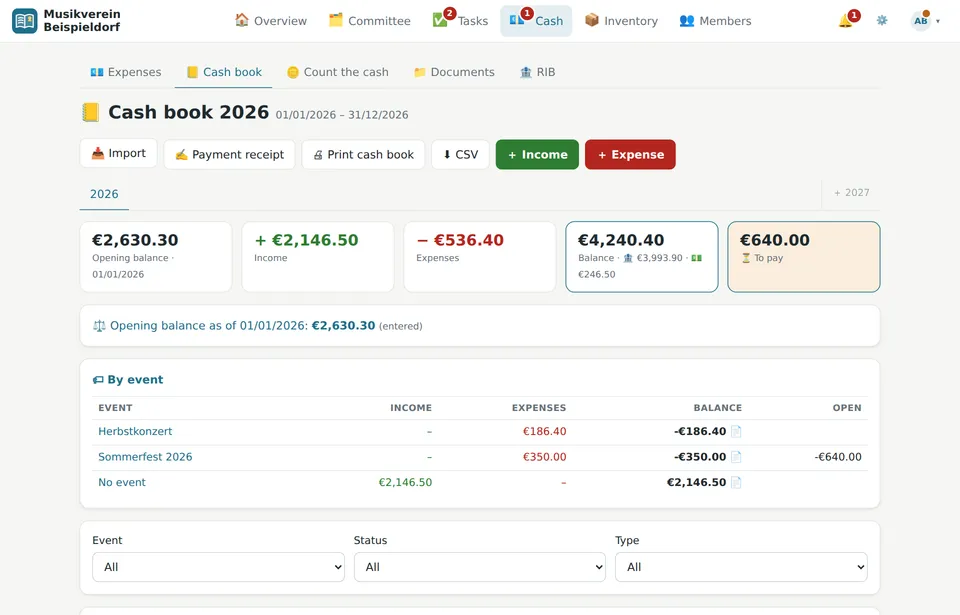
With the Pro plan, Veräinsbuch keeps a cash book per financial year with separate accounts such as bank, savings, cash and Payconiq. You photograph a receipt, the amount is recognised, and the receipt stays attached to the booking. Members submit their own expenses with a receipt; the treasurer approves them and marks them as paid. Bank statements can be imported, and every booking can be assigned to an event, so you see the balance per event straight away.
Before and after an event you count notes and coins in the app, and the result is booked automatically. For payments without an invoice you create a payment receipt signed on screen. At any time you can print the cash book or export it as PDF or CSV, for example for the auditors or for your own spreadsheet. Veräinsbuch is a simple cash book for small clubs, not double-entry accounting or tax software.
What it costs
The template above is free. The cash book in Veräinsbuch is part of the Pro plan at €14.95 per month per club, regardless of the number of members, including everything in Basis. Try all features free for 14 days, without a credit card, and cancel monthly.
Simple pricing
Per club, no matter how many members. Cancel any month.
Basis · 9,95 € / month
- Tasks & reminders
- Meeting minutes
- Events & polls
- Inventory
- Members, helpers & contacts
- Push, offline, 5 languages
- 500 MB storage included
Pro · 14,95 € / month
- Everything in Basis
- Cash & expenses with receipt scan
- Cash book & balance per event
- Bank statement import
- Cash count & payment proofs
- 1 GB storage included
Everything is unlocked during the 14-day trial. Then choose Basis or Pro – or simply stop. More storage if needed: +5 GB for €1.95 a month.
Frequently asked questions
Is the cash book template really free?
Yes. You can download the CSV file and use it in Excel, LibreOffice or Google Sheets without registering.
Why is the template a CSV file and not an Excel file?
CSV opens in every spreadsheet program. After opening it, save it in your program’s own format, such as .xlsx, so you can add formulas and formatting.
How do I calculate the balance column?
The first balance is the opening balance. For each following line, take the previous balance, add the income and subtract the expense. If you keep several accounts in one sheet, calculate a balance per account or use one sheet per account.
Do we need a separate cash book for bank and cash?
Not necessarily, but each account needs its own balance. The template has an Account column so you can filter by bank or cash; alternatively use one sheet per account.
How long should we keep receipts?
That depends on your constitution and the rules that apply to your club. Many clubs keep receipts for several years. If unsure, ask for advice and keep them rather than throw them away.
Can Veräinsbuch export our cash book to Excel?
Yes. With the Pro plan, the cash book can be exported as CSV for Excel or as PDF, for example for the auditors or the AGM.
Does Veräinsbuch collect membership fees?
No. Veräinsbuch does not collect fees or run direct debits. You record incoming payments in the cash book, for example by importing the bank statement.